
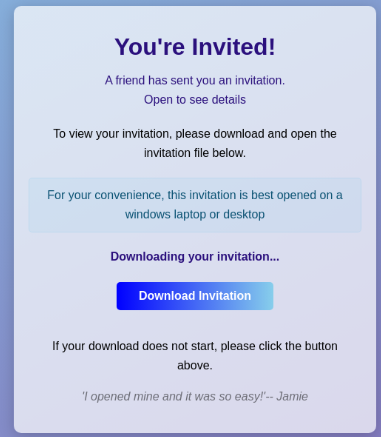
Please be aware, the style of phishing attempt shown above has been sent to organizations in Missouri and other states via compromised valid email accounts.
Phishing Email: “You’re Invited” which may be customized and sent from a known and valid compromised account. Sender/subject/contents/link may change. Example subject: “You’re Invited! Exclusive Invitation from [name]— RSVP Today”
Threat: After clicking on the link in the email, the user is prompted to install/allow ScreenConnect or other remote desktop software. This software allows the attacker to independently navigate the victim’s computer. The computer takeover may not be obvious/discernable to the victim.
Random links eventually resolve to:
- boviw[.]vu/punchbowl
- eventfowl[.]com
- a number of newly registered domains ending in [.]vu
Attackers may utilize this method to:
- Steal credentials
- Purchase gift cards
- Download contacts
- Access sensitive data
- Access other currently logged into systems (example: financial aid payment software in higher education)
- Install additional software
- Compromise of Google account
- Send additional phishing attempts to victims’ contacts
Investigation
A member organization shared these recommended steps with MOREnet, to investigate a known or suspected phishing incident involving ScreenConnect software:
- Check the user’s Chrome download history.
- Check the Windows Downloads folder.
- Search the workstation for ScreenConnect.ClientSetup.exe.
- Check installed applications for ScreenConnect.
- Review Windows security and application logs.
- Review endpoint security/EDR alerts.
- Verify whether a ScreenConnect process or service was started.
- Review Google Workspace account activity for unusual authentication or access following the event.
- If ScreenConnect was executed, investigate the workstation as a potential compromise.
- Continue monitoring district mail logs for additional messages containing the identified indicators.
- Maintain the malicious URL/domain block.
- Notify the sending organization through a separately verified communication method.
Security Measures to Help Protect Your Organization
- Restrict user rights to install software (remove local administrator rights)
- Block/alert for attempts to install or use unneeded remote desktop software through tools such as Akamai SIA, firewall, EDR, etc.
- Require other means of verification prior to allowing changes to direct deposit/banking information
- Require second factor authentication every time users access sensitive systems/financial systems
- Block newly registered domain interacting via organization firewall
- Refrain from storing credit card information perminantly in third party systems where user remains authenticated (example: Amazon account)
- Continue to reinforce messaging regarding verifying with the sender by another means (ex: phone call) before clicking any email links
- For Google account security tips, see the MOREnet blog article Detailed Tips for Investigating a Compromised Google Account
As always, if you have questions or would like assistance, our technical team is here to help.